.png?width=121&height=121&name=Untitled%20Design(13).png "Second Star Technologies IT Support Bakersfield CA Logo")
When ransomware shuts down a business, the pressure to restore everything immediately can be intense.
Employees can’t access files. Customers are waiting. Phones may be down. Accounting systems are unavailable. Every hour of downtime costs money.
But bringing systems back online too quickly can create a second disaster.
If compromised accounts, hidden malware, or attacker persistence remain in the environment, restored systems may be encrypted again. The safer approach is to rebuild trust first, then restore business operations in a controlled order.
A ransomware recovery plan should answer one important question before an incident occurs:
What needs to come back first, and what must wait?
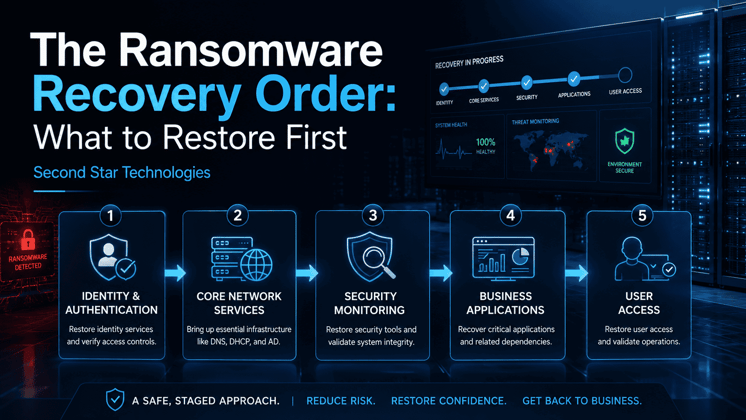
The answer usually follows a five-stage sequence:
- Identity and authentication
- Core network services
- Security monitoring
- Critical business systems
- User access
Each stage supports the one that follows. Skipping ahead may save a few hours in the moment, but it can also increase the risk of reinfection, data loss, and extended downtime.
Before Recovery Begins: Confirm the Threat Is Contained
Restoration should not begin while ransomware is still spreading.
Before recovering any production system, the incident response team should isolate affected devices, disable compromised accounts, pause unsafe backup or replication jobs, and determine how far the attacker reached.
The team should also preserve logs, ransom notes, encrypted file samples, and other evidence that may be needed for forensic analysis, insurance claims, legal review, or law enforcement.
The original point of entry must be addressed as well. That may include:
- A compromised remote access account
- A stolen Microsoft 365 credential
- An exposed VPN appliance
- An unpatched server
- A malicious email attachment
- A vulnerable line-of-business application
- A compromised administrator account
Restoring systems without closing that entry point is like repairing a broken window while the intruder is still inside the building.
Once the environment is contained, recovery can begin.
Restore Identity and Authentication First
Identity is the foundation of nearly every modern business network.
Systems such as Active Directory, Microsoft Entra ID, LDAP, multifactor authentication, privileged access tools, and certificate services control who can access company resources.
If those identity systems can’t be trusted, nothing connected to them can be fully trusted either.
Before restoring broader operations, the recovery team should:
- Identify compromised user and administrator accounts
- Reset privileged credentials
- Remove unknown or unauthorized accounts
- Review changes to security groups and permissions
- Validate domain controllers
- Restore multifactor authentication
- Rebuild administrative access
- Reapply least-privilege policies
- Check for new scheduled tasks, services, or remote access tools
Pay close attention to accounts with elevated privileges. Attackers often create backup administrator accounts or add existing accounts to powerful security groups so they can return later.
The organization may also need to rotate service account passwords, application credentials, API keys, and secrets used by backup systems or network appliances.
Until identity is secure, every server brought online may be exposed to stolen credentials.
Bring Core Network Services Back Online
Once authentication is trusted, the next step is restoring the services that allow the network to function.
Common priorities include:
- Domain Name System services
- Dynamic Host Configuration Protocol
- Time synchronization
- Certificate services
- Core switching and routing
- Firewalls
- Virtual private network access
- Wireless infrastructure
- Network management tools
- Secure remote administration
These systems may not appear important to end users, but most business applications depend on them.
For example, a restored accounting server may still be unusable if workstations can’t resolve its name through DNS. A business application may reject logins if system clocks are out of sync. Remote workers may remain disconnected until VPN services are rebuilt.
Whenever possible, core network services should be rebuilt from known-good configurations or restored inside a clean, isolated environment.
Avoid reconnecting old systems simply because they are available. A server that appears functional may still contain malicious tools, altered settings, or unauthorized access.
Restore Security Monitoring Before User Access
One of the most dangerous recovery mistakes is allowing employees back into the environment before security teams can see what is happening.
Security tools should be restored and tested before broad production access returns. Our cybersecurity services include endpoint detection and security monitoring.
This may include:
- Endpoint detection and response
- Antivirus protection
- Centralized event logging
- Security information and event management
- Network intrusion detection
- Email security
- Firewall logging
- Cloud security alerts
- Backup monitoring
- Vulnerability scanning
- Remote monitoring and management
The recovery team should confirm that endpoints are checking in, logs are reaching the correct system, alerts are being generated, and suspicious behavior can be investigated.
Threat hunting should also continue during recovery.
Look for:
- Unexpected administrator logins
- New local user accounts
- Unusual PowerShell activity
- Remote access software
- Scheduled tasks
- New services
- Disabled security tools
- Large outbound data transfers
- Authentication attempts from unfamiliar locations
- Repeated access to backup repositories
If attackers still have access, the security team needs enough visibility to detect them before the organization fully reopens.
Restore Critical Business Systems in Stages
After identity, networking, and monitoring are stable, the organization can begin restoring business applications.
The correct order depends on how the company operates.
A medical practice, manufacturing company, law firm, retailer, and construction business may each have different priorities. Recovery should be based on business impact and system dependencies, not simply on which backup is easiest to restore.
A typical recovery sequence might include:
- Financial and revenue systems
- Line-of-business applications
- Customer or patient management systems
- Email and collaboration services
- File servers
- Department-specific applications
- End-user devices
Some organizations may need phones, scheduling, or dispatch systems before email. Others may need inventory, payroll, or production control systems first.
The goal is to restore the smallest group of systems needed to resume essential operations.
This is sometimes called minimum viable recovery.
Instead of waiting until the entire company is back to normal, the business restores enough capacity to perform its most important functions safely. Additional systems can return in later stages.
Validate Every Restore
A successful restore job does not automatically mean the system is safe or usable.
Each restored system should go through a validation process that includes:
- Confirming the backup completed before the compromise
- Scanning the restored system for malware
- Checking operating system and application integrity
- Applying missing security updates
- Closing the original attack path
- Testing application functions
- Confirming data accuracy
- Checking integrations with other systems
- Reviewing permissions
- Monitoring the system before wider access
Where possible, backups should first be restored into an isolated clean room or staging network.
This allows the recovery team to inspect the system without immediately connecting it to production. It also reduces the chance that hidden malware will communicate with other devices or external command-and-control infrastructure.
Return Users in Controlled Groups
User access should be one of the final stages of ransomware recovery.
Bringing everyone back at once creates a flood of logins, network traffic, support calls, and security alerts. That activity can make it difficult to distinguish normal behavior from signs of continued compromise.
A phased return might begin with:
- Incident response personnel
- System administrators
- Security staff
- Department managers
- Critical business users
- Small employee groups
- Remaining employees
Between each group, the recovery team should review:
- Login activity
- Endpoint alerts
- Network traffic
- Application errors
- Help desk requests
- Access failures
- Signs of abnormal behavior
Employees should also receive clear instructions before reconnecting.
They may need to reset passwords, enroll in multifactor authentication, use replacement devices, avoid old email attachments, or report unusual prompts and login activity.
Do Not Automatically Restore Every Device
In many ransomware incidents, rebuilding computers is safer than restoring them.
Workstations that were connected during the attack may contain malicious files, stolen credentials, or persistence tools that are difficult to identify with confidence.
For higher-risk devices, the recovery plan may call for:
- Wiping the drive
- Reinstalling the operating system
- Applying all updates
- Installing security software
- Rejoining the trusted environment
- Restoring only validated user data
Servers may require similar treatment, especially when the organization cannot prove that a backup predates the attacker’s access.
The goal is not to preserve every old configuration. The goal is to create a clean environment the business can trust.
Keep Backups Protected During Recovery
Backup systems require special care during a ransomware incident.
Attackers frequently search for backup servers, cloud consoles, storage appliances, and administrator credentials. Their goal is to delete or encrypt recovery copies before launching the final attack.
During recovery, organizations should:
- Restrict access to backup consoles
- Rotate backup administrator credentials
- Confirm immutable retention settings
- Review deletion activity
- Check replication history
- Test backup integrity
- Scan restored data
- Keep at least one clean copy isolated
A strong backup strategy should follow the 3-2-1-1-0 approach:
- Three copies of important data
- Two different storage types
- One copy stored offsite
- One immutable, offline, or air-gapped copy
- Zero unverified recovery errors
The final zero matters.
A backup that has never been tested is only an assumption.
Recovery Is About Trust, Not Just Speed
Fast recovery matters, but speed alone is not the goal.
A server that comes online quickly and gets encrypted again is not a successful recovery. Neither is an application that works but contains corrupted data, altered permissions, or hidden attacker access.
A reliable ransomware recovery follows a deliberate order:
- Contain the incident
- Rebuild trusted identity
- Restore core network services
- Re-enable security monitoring
- Recover critical business systems
- Validate each stage
- Return users gradually
This order helps the business recover without recreating the conditions that allowed the attack to succeed.
Build the Recovery Order Before an Attack
The middle of a ransomware incident is the worst time to decide what matters most.
A ransomware recovery runbook should document:
- Critical business services
- Supporting technology dependencies
- Recovery priorities
- System owners
- Backup locations
- Administrative access procedures
- Validation requirements
- Communication responsibilities
- Vendor contacts
- Recovery time goals
- Escalation procedures
The runbook should also be tested.
Tabletop exercises and recovery drills can reveal missing passwords, outdated documentation, broken backups, unsupported software, and hidden system dependencies before they become emergency problems.
Second Star Technologies helps small and midsized businesses evaluate backup systems, document recovery priorities, and build practical ransomware recovery runbooks.
Get help building a ransomware recovery plan that identifies what to restore first, how to validate it, and how to bring your business back online safely.
Ransomware Recovery Frequently Asked Questions
What should be restored first after a ransomware attack?
Trusted identity and authentication services should usually be restored first. This includes Active Directory, Microsoft Entra ID, multifactor authentication, privileged accounts, and other systems that control access. Restoring identity first helps prevent compromised credentials from being used against newly recovered systems.
What is the correct ransomware recovery order?
A safe ransomware recovery order begins with containment, followed by identity and authentication, core network services, security monitoring, critical business applications, and phased user access. Each stage should be validated before the recovery team moves to the next.
Why should Active Directory be restored before business applications?
Active Directory controls authentication, permissions, administrative access, and many application dependencies. If the identity environment is still compromised, attackers may be able to access or reinfect restored applications and servers.
Should employees be allowed back online immediately after ransomware?
Employees should return only after identity, network services, security monitoring, and critical systems have been restored and validated. User access should be restored in controlled groups so the recovery team can monitor authentication, endpoint alerts, network behavior, and application performance.
Can ransomware return after systems are restored?
Yes. Ransomware or attacker access can return if compromised accounts, malicious tools, unsafe backups, unpatched vulnerabilities, or hidden persistence remain in the environment. Systems should be scanned, patched, tested, and monitored before they are returned to production.
What is a ransomware recovery runbook?
A ransomware recovery runbook is a written sequence of recovery actions. It identifies critical systems, technical dependencies, backup locations, responsible personnel, validation requirements, communication procedures, recovery priorities, and the order in which systems and users should return.
For help assessing your recovery priorities, contact Second Star Technologies or review our business backup and disaster recovery services in Bakersfield.
References
Cybersecurity and Infrastructure Security Agency. (2023). StopRansomware guide. U.S. Department of Homeland Security. https://www.cisa.gov/stopransomware/ransomware-guide
National Institute of Standards and Technology. (2018). Framework for improving critical infrastructure cybersecurity (Version 1.1). https://www.nist.gov/cyberframework
National Institute of Standards and Technology. (2020). Security and privacy controls for information systems and organizations (NIST Special Publication 800-53, Revision 5). U.S. Department of Commerce. https://doi.org/10.6028/NIST.SP.800-53r5
National Institute of Standards and Technology. (2022). Guide for cyberattack recovery (NIST Special Publication 1800-11). National Cybersecurity Center of Excellence. https://www.nccoe.nist.gov/projects/building-blocks/data-integrity/guide
National Institute of Standards and Technology. (2022). Information security handbook: A guide for managers (NIST Special Publication 800-100). U.S. Department of Commerce. https://csrc.nist.gov/publications/detail/sp/800-100/final
%E2%80%93%20Key%20Qualities%20%26%20Red%20Flags.jpeg?height=230&name=How%20to%20Choose%20the%20Right%20Managed%20IT%20Services%20Provider%20(MSP)%E2%80%93%20Key%20Qualities%20%26%20Red%20Flags.jpeg)
Leave a Comment