.png?width=121&height=121&name=Untitled%20Design(13).png "Second Star Technologies IT Support Bakersfield CA Logo")
Ransomware is not just an IT problem anymore. It is a business shutdown problem. A single attack can lock files, steal data, disable servers, damage backups, and stop employees from doing their work.
Many businesses think they are protected because they have antivirus software and backups. That is a dangerous assumption. Modern ransomware groups often look for backup systems first because they know clean backups give a business a way out.
A good ransomware plan should answer one simple question: if everything went wrong today, could the business recover safely without guessing?
Why Ransomware Recovery Is Harder Than It Looks
Most ransomware discussions focus on encrypted files.
That is only part of the problem.
A serious ransomware attack can affect:
- File servers
- Cloud storage
- Email accounts
- User passwords
- Administrator accounts
- Backup systems
- Remote access tools
- Accounting software
- Line-of-business applications
- Vendor connections
- Customer data
This is why recovery is not the same as restoring a few files.
A business may have a backup and still be stuck. The backup may be outdated, infected, overwritten, inaccessible, or tied to the same admin account the attacker already compromised.
That is where many recovery plans fail.
They are built around the backup tool instead of the business.
The Backup Trap
Backups are required. But backups alone are not a recovery plan.
A backup only answers one question:
Do we have a copy of the data?
A real recovery plan answers better questions:
- Can we trust the backup?
- Is the backup clean?
- Who can access it?
- Can an attacker delete it?
- How long would restoration take?
- Which systems must come back first?
- Can users log in safely after restoration?
- Can the business operate in a limited state?
- Has the recovery process been tested?
If those questions have not been answered, the business does not have a ransomware recovery plan. It has hope.
And hope is not a control.
Why Sync-Based Backups Can Fail
Many businesses use cloud sync tools or automated backups. These are useful, but they can also create risk.
Ransomware changes files quickly. A sync tool may treat those encrypted files as normal updates. Then it pushes those damaged files into cloud storage or backup locations.
That creates a painful chain reaction:
- Local files get encrypted.
- The encrypted files sync to the cloud.
- Good versions may be overwritten.
- Backup sets may become harder to trust.
- Recovery takes longer.
- Downtime grows.
This does not mean cloud backup is bad.
It means cloud backup needs guardrails.
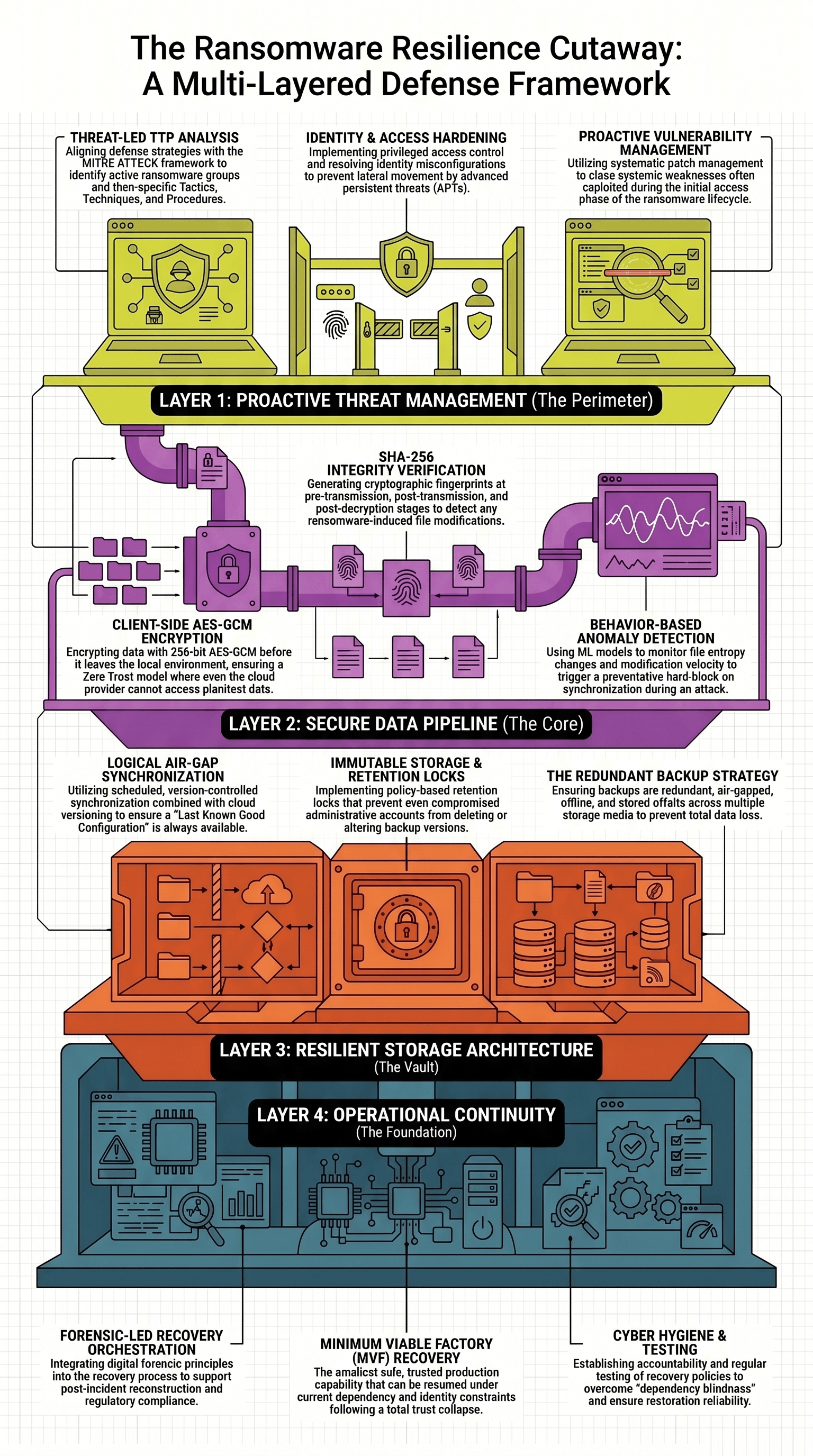
A ransomware-ready backup system should include version history, immutability, separate credentials, alerting, tested restore points, and at least one copy that ransomware cannot easily reach.
Immutable Backups Matter
Immutable backups are designed so backup data cannot be changed or deleted for a set time.
That matters because ransomware attackers often steal admin credentials. If an attacker gets access to an admin account, they may be able to delete regular backups before launching the final encryption attack.
Immutable storage helps stop that.
A stronger backup model should include:
- A local copy for fast recovery
- An offsite copy for disaster recovery
- An offline or isolated copy
- Immutable retention
- Encrypted backup storage
- Separate backup admin accounts
- Regular restore testing
The goal is simple.
An attacker should not be able to destroy every recovery option from one compromised account.
Air-Gapped Backups Still Have a Place
An air gap means the backup is separated from the production network.
There are two common types.
A physical air gap means the backup is disconnected from the network. This may include offline drives, removable storage, or tape.
A logical air gap means the system is still online, but protected through strict access controls, retention locks, isolation, and backup policies.
Both can help.
Physical air gaps are harder for attackers to reach remotely. Logical air gaps are easier to automate and often faster to restore from.
For many small businesses, the best answer is not one or the other. It is a layered approach.
Use fast local backups for quick restores. Use cloud or offsite backup for site-level failure. Use immutable or offline copies as the last line of defense.
Zero Trust Reduces the Blast Radius
Zero Trust sounds like a buzzword, but the basic idea is practical.
Do not automatically trust a user, device, or system just because it is already inside the network.
Ransomware spreads when one compromised account can reach too much. Zero Trust reduces that risk by limiting access and requiring stronger proof before access is granted.
For a small business, Zero Trust can include:
- Multi-factor authentication
- Least privilege permissions
- Separate admin accounts
- Conditional access
- Device checks
- Strong password rules
- Limited remote access
- Better logging
- Regular access reviews
This does not make the business ransomware-proof.
Nothing does.
But it can slow an attacker down and limit the damage.
Network Segmentation Creates Smaller Blast Zones
A flat network is risky.
If every computer can reach every server, shared folder, backup device, and business application, ransomware has an easier path.
Network segmentation separates systems based on function and risk.
A practical small business setup may separate:
- Guest Wi-Fi from business systems
- Workstations from servers
- Accounting systems from general users
- Backup systems from everyday access
- VoIP phones from computers
- Cameras and IoT devices from core systems
- Remote access tools from internal management systems
The goal is not to make the network harder to manage.
The goal is to make the attack harder to spread.
A ransomware event on one workstation should not automatically become a full network outage.
Privileged Accounts Need Special Protection
Attackers want admin accounts.
Admin access can let them disable security tools, delete backups, create new accounts, change permissions, access servers, and move through the network.
That is why privileged access needs special treatment.
A safer setup includes:
- No daily work from admin accounts
- No shared admin accounts
- MFA for administrator access
- Separate backup admin credentials
- Strong logging for admin activity
- Removal of old vendor accounts
- Monthly review of privileged users
- No local admin rights for standard users
- Unique local admin passwords on endpoints
This is one of the most important areas for ransomware defense.
If admin access is weak, every other control becomes easier to break.
Detection Should Focus on Behavior
Traditional antivirus still matters, but ransomware detection cannot depend only on known malware signatures.
Ransomware often has behavior patterns.
Warning signs may include:
- Sudden mass file changes
- Large numbers of file renames
- New file extensions appearing quickly
- Abnormal access to shared folders
- Attempts to delete shadow copies
- Attempts to disable security tools
- Unusual PowerShell activity
- Failed login spikes
- New admin accounts
- Unusual outbound data transfers
- Fast encryption-like changes across many files
This is why endpoint detection, logging, and alert review matter.
The earlier a business catches the behavior, the better chance it has to isolate the system before the damage spreads.
Ransomware Is Also a Data Theft Problem
Older ransomware attacks focused mostly on locking files.
Modern attacks often include data theft.
That changes the recovery process.
If sensitive data was stolen, restoring from backup does not solve the whole problem. The business may need to determine what was accessed, what was copied, who must be notified, and what legal or regulatory duties apply.
This is why incident response should include more than IT.
A ransomware response plan may need:
- IT support
- Management
- Legal counsel
- Cyber insurance contacts
- Forensic support
- Public relations support
- Key vendors
- Client communication procedures
The business needs to know who makes decisions before the pressure hits.
Minimum Viable Recovery
Full recovery can take time.
During a serious incident, the better first goal may be minimum viable recovery.
That means restoring the smallest set of trusted systems needed to operate safely.
For a normal office, that may include:
- Internet access
- Phones
- Accounting
- Scheduling
- Core files
- One clean workstation for key staff
- Access to customer records
- A way to invoice and collect payments
For a manufacturing business, minimum viable recovery may include the systems needed to schedule work, authenticate operators, verify production data, reconnect safe equipment, and coordinate with suppliers.
The idea is simple.
Do not try to restore everything at once.
Restore what the business needs first, then rebuild in a controlled order.
The Recovery Order Matters
Restoring systems in the wrong order can create more risk.
A practical recovery order may look like this:
- Isolate affected systems.
- Preserve evidence.
- Identify the likely entry point.
- Confirm which systems were affected.
- Disable compromised accounts.
- Secure administrator access.
- Confirm clean backup points.
- Rebuild core identity services.
- Restore network services.
- Restore security monitoring.
- Restore critical servers.
- Restore business applications.
- Restore user access in stages.
- Monitor for reinfection.
- Document what happened.
This order may vary by business, but the principle is the same.
Do not restore infected systems into an untrusted environment.
A Practical Ransomware Readiness Checklist
Use this as a starting point.
Backup Readiness
- Critical systems are backed up.
- Backups are encrypted.
- At least one backup is offsite.
- At least one backup is offline or isolated.
- Backup storage has immutable retention.
- Backup admin accounts are separate.
- Restore tests are performed.
- Restore test results are documented.
- Backup alerts are monitored.
- Backup access is limited.
Identity Readiness
- MFA is enabled.
- Admin accounts are separate.
- Old accounts are disabled.
- Vendor accounts are reviewed.
- Password policies are enforced.
- Privileged access is logged.
- Emergency access accounts are protected.
- Identity recovery steps are documented.
Network Readiness
- Guest Wi-Fi is isolated.
- Servers are separated from workstations.
- Backup systems are restricted.
- Remote access is limited.
- Firewall rules are reviewed.
- Critical systems are segmented.
- Unneeded services are disabled.
- Network diagrams are current.
Endpoint Readiness
- Endpoint protection is installed.
- Security alerts are monitored.
- Patches are applied.
- Local admin rights are limited.
- PowerShell use is monitored.
- Devices are encrypted.
- Unsupported operating systems are removed.
- Lost or stolen devices can be locked.
Incident Response Readiness
- Response contacts are current.
- Cyber insurance contacts are documented.
- Legal contacts are documented.
- Vendor contacts are documented.
- Communication templates are prepared.
- Decision authority is clear.
- Evidence preservation steps are known.
- Staff know who to call.
What Small Businesses Should Do First
Most small businesses do not need to start with an expensive security overhaul.
Start with the controls that reduce the most risk.
Priority steps:
- Turn on MFA for email, cloud apps, remote access, and admin accounts.
- Remove local admin rights from standard users.
- Protect backups with immutable or offline storage.
- Test restoring real files and systems.
- Patch internet-facing systems quickly.
- Replace exposed remote desktop access with safer remote access.
- Separate guest Wi-Fi from business systems.
- Review old employee and vendor accounts.
- Monitor security alerts.
- Write down the recovery order.
These steps are not flashy.
They work because they protect the common failure points.
The Bottom Line
Ransomware resilience is not one product.
It is a system.
A business needs protected backups, strong identity controls, segmented networks, endpoint detection, tested recovery, and a clear response plan. The most important question is not whether the business has backups. The better question is whether the business can restore clean systems, verify trust, and keep operating after an attack.
A ransomware plan should be tested before it is needed.
Because during an attack, guessing gets expensive fast.
References
Baftiu, N., Sofiu, E., Pachemska, T., & Atanasova, A. (2026). A technical analysis of modern ransomware operations and defense mechanisms. SAR Journal, 9(1), 67–74. https://doi.org/10.18421/SAR91-08
Cabaj, K., & Mazurczyk, W. (2016). Using software-defined networking for ransomware mitigation: The case of CryptoWall. IEEE Network, 30, 14–20. https://doi.org/10.1109/MNET.2016.1600110NM
Chincholkar, A., Chauhan, A., Gher, Y., Mogarkar, P., & Nirmal, A. (2025). An encryption-based automated cloud backup and recovery framework with ransomware resistance. International Journal of Engineering Research & Technology, 14(10). https://doi.org/10.5281/zenodo.18080873
Chiu, C. Y. (2026). From backup restoration to minimum viable factory recovery: A systematization of ransomware recovery in manufacturing systems. arXiv. https://doi.org/10.48550/arXiv.2605.16167
Hernandez-Castro, J., Cartwright, E., & Stepanova, A. (2017). Economic analysis of ransomware. arXiv. https://arxiv.org/abs/1703.06660
Hou, X., Lu, Y., Karanjai, R., Xu, L., & Shi, W. (2026). zkRansomware: Proof-of-data recoverability and multi-round game theoretic modeling of ransomware decisions. arXiv. https://doi.org/10.48550/arXiv.2601.06667
Ilau, M.-C., Baldwin, A., Caulfield, T., & Pym, D. (2025). Modelling and simulating organizational ransomware recovery: Structure, methodology, and decisions. Journal of Cybersecurity, 11(1), Article tyaf035. https://doi.org/10.1093/cybsec/tyaf035
Lawall, A., & Beenken, P. (2024). A threat-led approach to mitigating ransomware attacks: Insights from a comprehensive analysis of the ransomware ecosystem. In Proceedings of the European Interdisciplinary Cybersecurity Conference. Association for Computing Machinery. https://doi.org/10.1145/3655693.3661321
TU Delft Repository. (n.d.). Operational resilience: Backup strategies for crisis management in the ransomware era. https://repository.tudelft.nl/record/uuid:17e68d16-0918-4592-8f27-aa36b864fc98
Vieira, L., Curralo, D., & Ventura, D. (2026). Resilience and recovery against ransomware in corporate networks. Zenodo. https://doi.org/10.5281/zenodo.18331371
%E2%80%93%20Key%20Qualities%20%26%20Red%20Flags.jpeg?height=230&name=How%20to%20Choose%20the%20Right%20Managed%20IT%20Services%20Provider%20(MSP)%E2%80%93%20Key%20Qualities%20%26%20Red%20Flags.jpeg)
Effective Disaster Recovery Planning
{% module_block module "widget_5cfdbeb0-e6cf-415b-83e3-3ec682079502" %}{% module_attribute...
Leave a Comment