.png?width=121&height=121&name=Untitled%20Design(13).png "Second Star Technologies IT Support Bakersfield CA Logo")
Ransomware recovery used to sound simple. Restore the backup, bring the server back online, and get back to work. That is no longer enough. Modern ransomware attacks often go after the recovery path first because attackers know backups are the business’s last line of defense.
A backup only matters if it survives the attack, restores cleanly, and supports the work the business actually needs to perform. That means recovery planning has to move past the question, “Do we have backups?” A better question is, “Can we prove we can recover safely?”
The Backup Problem Most Businesses Miss
Many businesses have backups.
Far fewer have tested, isolated, documented, and ransomware-ready recovery.
That gap matters because ransomware can damage more than the main file server. It can affect:
- Backup repositories
- Backup admin accounts
- Domain admin accounts
- Cloud sync tools
- Shared folders
- Remote access tools
- Line-of-business applications
- Vendor connections
- Security logs
- Workstations used for administration
If all of those systems share the same accounts, network paths, or management tools, the backup system may be inside the same blast radius as everything else.
That creates a dangerous false sense of safety.
The backup may exist, but the attacker may still be able to delete it, encrypt it, shorten retention, or poison it before the business knows anything is wrong.
The Better Standard: 3-2-1-1 Backups
The classic 3-2-1 backup rule still matters.
It means:
- Keep 3 copies of your data
- Store them on 2 different types of media
- Keep 1 copy offsite
But ransomware changed the standard.
The stronger model is 3-2-1-1.
That last “1” means at least one copy should be offline, immutable, or otherwise protected from being changed or deleted.
For a small business, this might include:
- Immutable cloud backups
- A hardened backup repository
- Offline storage
- Backup storage with retention lock
- A separate recovery account
- Backup admin accounts that are not synced with normal user accounts
The goal is simple.
If the attacker gets into the main network, they should not automatically get the keys to the recovery system.
What Immutable Backups Do Well
Immutable backups help protect recovery points from being changed or deleted during a set retention period.
That matters because many ransomware attacks start by looking for the recovery path. Attackers may try to:
- Delete backup jobs
- Remove restore points
- Encrypt backup storage
- Disable backup agents
- Change retention policies
- Compromise backup admin accounts
- Destroy shadow copies
Immutability makes that harder.
Even if an administrator account is compromised, properly configured immutable storage can prevent backup data from being erased during the locked retention window.
That can be the difference between a painful recovery and a business-ending loss.
What Immutable Backups Do Not Solve
Immutable backups are powerful, but they do not fix everything.
They do not prove that:
- The backup is clean
- The restored server is safe
- The data is complete
- The business application will work
- The credentials are still trustworthy
- The recovery process meets your RTO
- The most recent backup is the right one to restore
That last point is important.
In a ransomware event, the newest backup may not be the safest backup.
If the attacker was inside the network for days or weeks, recent backups may contain malware, backdoors, stolen credentials, or changed settings. Restoring the newest copy without checking it can bring the attacker right back into the business.
That is why recovery needs validation, not just restoration.
Restore Testing Is the Real Proof
A backup job report only tells you that a backup ran.
It does not prove you can recover.
A restore test answers the questions that matter during a real incident:
- Can the data be restored?
- How long does it take?
- Does the application open?
- Are permissions intact?
- Are files readable?
- Are databases consistent?
- Are critical dependencies missing?
- Did the restore meet the business’s recovery target?
- Were the steps documented well enough for someone else to repeat?
Businesses should test different restore types, including:
- File-level restores
- Full server restores
- Database restores
- Cloud workload restores
- SaaS data restores
- Bare-metal or full-system recovery
- Isolated ransomware recovery drills
The test should be timed and documented.
A simple restore log should include:
- Date of test
- System tested
- Restore point used
- Type of restore
- Time to restore
- Result
- Problems found
- Follow-up owner
- Next test date
That record becomes useful for insurance, compliance, management, and future incident response.
Recovery Must Happen in Isolation
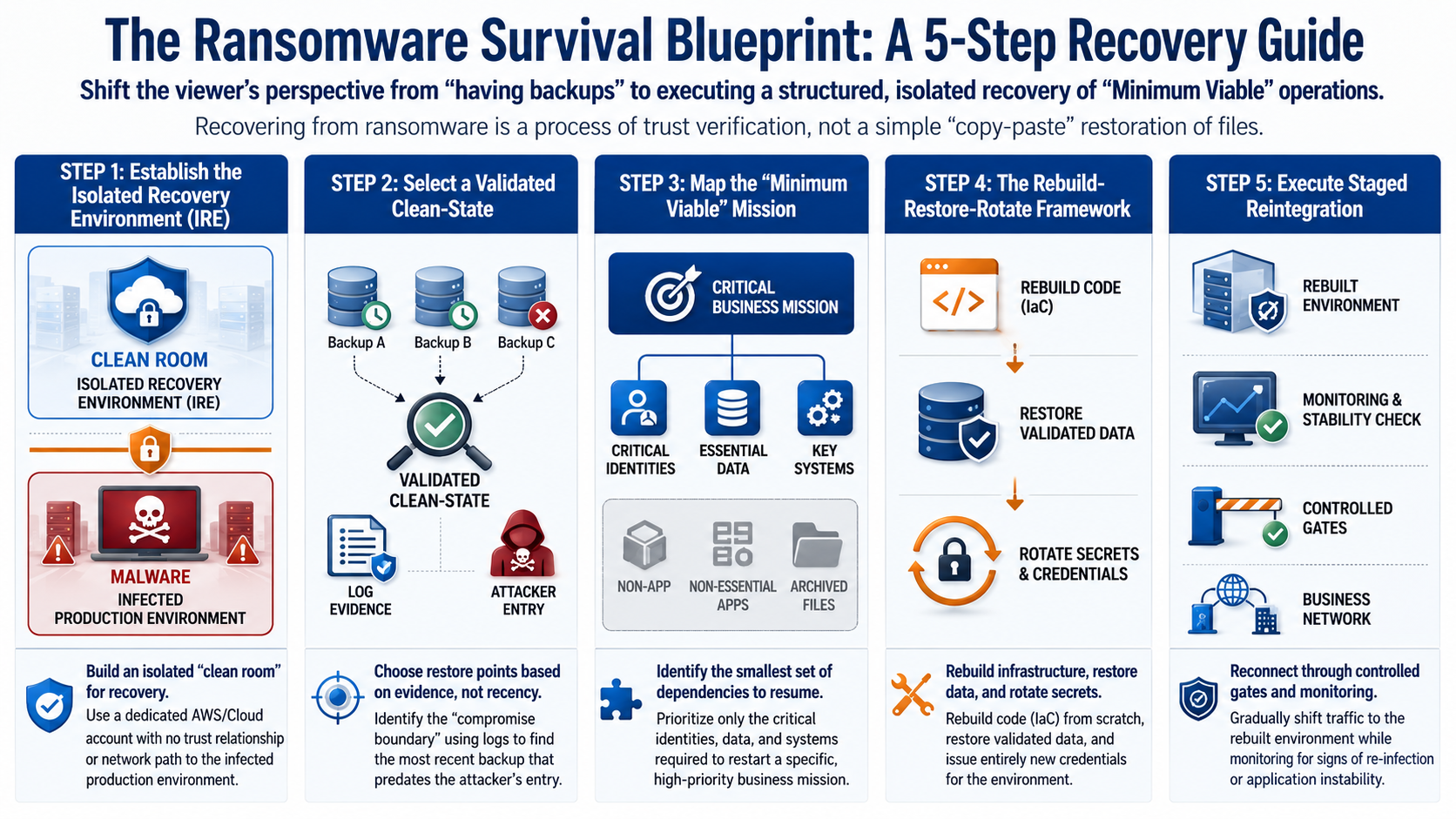
One of the biggest ransomware recovery mistakes is restoring systems back into a dirty environment.
If the original network is still compromised, a clean restore can become infected again.
A safer recovery model uses an isolated recovery environment. This is a separate space where systems can be restored, scanned, checked, and approved before they reconnect to production.
A good isolated recovery environment should have:
- No trust relationship with the compromised domain
- No direct network path back to the infected network
- Separate admin credentials
- Strong MFA
- Limited access
- Logging enabled
- Malware scanning
- Clear approval steps before cutover
The point is containment.
If a restored backup still contains malware, the infection should stay trapped in the recovery environment.
Do Not Trust the Old Identity System Too Quickly
Identity is one of the hardest parts of ransomware recovery.
If domain admin accounts were compromised, the business cannot assume old accounts, passwords, service accounts, API keys, certificates, or remote access tools are safe.
A clean recovery plan should include an identity clean-room.
That means the recovery process uses trusted administrative access that does not depend on the possibly compromised production identity system.
This may include:
- Separate recovery admin accounts
- Non-synced backup accounts
- MFA on recovery access
- Privileged access workstations
- Fresh passwords
- New API keys
- New certificates
- Revoked old sessions
- Reviewed permissions
- Removed stale admin accounts
Recovery is not just about getting data back.
It is about rebuilding trust.
Use the Rebuild, Restore, Rotate Method
A practical ransomware recovery plan should sort systems into three groups.
Rebuild from trusted code
Infrastructure and configuration should be rebuilt from known-good sources whenever possible.
This may include:
- Firewall rules
- Cloud policies
- Server templates
- Network settings
- Security groups
- Application deployment settings
- Infrastructure as code
Restoring old configuration without review can bring back the same weakness the attacker used.
Restore validated data
Business data usually has to come from backup.
That includes:
- Databases
- File shares
- Application data
- Accounting data
- Customer records
- Project files
- Email archives
But the data should be restored only after it passes checks.
Those checks may include malware scans, database checks, application tests, and log review.
Rotate credentials
Credentials should not be carried forward from the compromised window.
Replace or reissue:
- Admin passwords
- Service account passwords
- API keys
- VPN credentials
- Database passwords
- OAuth tokens
- SSH keys
- Digital certificates
The rule is simple.
Infrastructure should be rebuilt.
Data should be restored.
Credentials should be new.
Pick the Safest Recovery Point, Not Just the Newest One
During a normal hardware failure, the newest backup is usually the best choice.
During a ransomware event, that may be wrong.
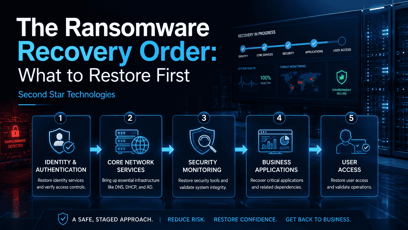
The recovery team needs to build a timeline.
The goal is to find the earliest signs of compromise, then identify backups that were created before that window. From there, candidate backups should be tested in reverse order, starting with the most recent backup that appears to predate the compromise.
A safe recovery point should be supported by evidence, such as:
- Security logs
- Endpoint alerts
- Firewall logs
- Cloud audit logs
- Backup job history
- Identity changes
- Admin activity
- Malware scan results
- Application integrity checks
- Database consistency checks
If a backup fails validation, step back to an earlier one.
This may increase data loss, but it may also prevent a second infection.
Recovery Should Focus on Business Capability
A server being online does not mean the business has recovered.
For some businesses, recovery means employees can access files and email.
For others, it means orders can be processed, jobs can be scheduled, invoices can be sent, phones work, customers can be served, and critical software is running.
Manufacturing and operational environments are even more complex. A plant might restore servers but still be unable to schedule production, authenticate operators, inspect quality, reconnect equipment, or ship products.
That is why recovery should be planned around capability.
Ask:
- What is the smallest useful operation we must restore first?
- Which systems support that operation?
- Which users need access?
- Which vendors or suppliers are required?
- Which data must be trusted?
- Which manual workarounds are allowed?
- What safety checks must stay in place?
- What evidence proves this limited restart is safe?
This is sometimes called a minimum viable recovery or, in manufacturing, a Minimum Viable Factory approach.
The idea is not to declare full recovery too early.
The idea is to restore the smallest safe and useful business function first, then expand from there.
Common Ransomware Recovery Failure Modes
Many recovery failures are not caused by one missing backup.
They come from planning gaps.
Common failure modes include:
Backup deletion or encryption
The attacker reaches the backup system and destroys recovery points before launching ransomware.
Fix: Use immutable or offline backups with separate credentials and retention protection.
Backup poisoning
The backup restores, but it contains malware, backdoors, or attacker-created accounts.
Fix: Restore into an isolated environment and validate before reconnecting.
Identity trust collapse
The domain, admin accounts, service accounts, or remote access tools can no longer be trusted.
Fix: Use clean recovery identities, reset credentials, revoke sessions, and rebuild admin access.
Capability mismatch
Servers come back online, but the business still cannot perform the work that matters.
Fix: Plan recovery around business functions, not just individual assets.
Untested recovery
The backup exists, but no one has proved it can restore under pressure.
Fix: Run routine restore tests and keep clear records.
Supplier dependency failure
Internal systems recover, but a critical vendor, logistics partner, software provider, or outsourced service is still unavailable.
Fix: Include vendors and outside dependencies in the recovery plan.
Unsafe reconnection
Recovered systems are connected too quickly and spread infection or create operational risk.
Fix: Use staged reconnection gates with monitoring and approval.
No proof of recovery
The team cannot show why a restored environment is safe to use.
Fix: Build an evidence bundle for each major recovery decision.
Build a Proof-of-Recovery Bundle
A proof-of-recovery bundle is the record that supports the decision to bring systems back online.
It does not need to be fancy.
It does need to be clear.
Include:
- The restore point selected
- Why that restore point was chosen
- Malware scan results
- Database or application check results
- Credential reset status
- Admin account review
- Configuration validation
- Network reconnection approval
- Known risks
- Monitoring plan
- Rollback plan
- Who approved the restart
This protects the business from guesswork.
It also helps leadership, insurers, auditors, and technical teams understand what was done and why.
Practical Ransomware Recovery Checklist
Use this as a baseline.
- Identify your most critical systems.
- Assign RTO and RPO targets to each system.
- Move toward a 3-2-1-1 backup model.
- Add immutable or offline backup protection.
- Separate backup admin accounts from normal domain accounts.
- Require MFA for backup and recovery systems.
- Document who can approve restores.
- Create an isolated recovery environment.
- Test file, server, database, and application restores.
- Time every restore test.
- Scan restored systems before reconnecting them.
- Rotate credentials during recovery.
- Keep copies of restore logs.
- Map vendor and supplier dependencies.
- Define the smallest useful business function to restore first.
- Create a proof-of-recovery bundle before production cutover.
- Review the plan after every major system change.
The Bottom Line
Backups are necessary, but they are not the full ransomware recovery plan.
A real plan answers harder questions.
Can the backups survive the attack? Can the business restore them fast enough? Can the team prove the restored data is clean? Can identity be trusted? Can the company resume a useful business function without spreading the infection again?
That is the standard businesses need now.
A backup is only a copy of data.
Recovery is the ability to bring the business back in a safe, tested, and trusted way.
References
Amazon Web Services. (2026, May 20). Cyber resilience on AWS: A reference approach for recovery from ransomware and destructive events. AWS Architecture Blog. https://aws.amazon.com/blogs/architecture/cyber-resilience-on-aws-a-reference-approach-for-recovery-from-ransomware-and-destructive-events/
Bishop, J. K. (2025, May 13). Backups that survive ransomware: Architecture, access, and testing. Stage Four Security. https://stagefoursecurity.com/blog/2025/05/13/backups-that-survive-ransomware/
Chiu, C. Y. (2026). From backup restoration to minimum viable factory recovery: A systematization of ransomware recovery in manufacturing systems. arXiv. https://arxiv.org/html/2605.16167v1
Critical Sight. (2026, January 2). Backups that beat ransomware: 2026 BCDR essentials from CISA’s #StopRansomware guidance and recent alerts. https://criticalsight.com/backups-that-beat-ransomware-2026-bcdr-essentials-from-cisas-stopransomware-guidance-and-recent-alerts/
ISMS Lite Team. (2026, February 26). Backup strategy and restore tests: Because backups alone are not enough. ISMS Lite. https://www.ismslite.de/en/blog/backup-strategy-restore-tests
N2CON. (2026, March). Immutable backups + restore testing: A practical ransomware recovery baseline. https://www.n2con.com/resources/immutable-backups-restore-testing/
Leave a Comment