7 Hidden IT Problems Slowing Down Your Business Right Now
{% module_block module "widget_aea3e33a-c2a1-4bca-b631-f646c8e76a7f" %}{% module_attribute "audio"...
.png?width=121&height=121&name=Untitled%20Design(13).png "Second Star Technologies IT Support Bakersfield CA Logo")
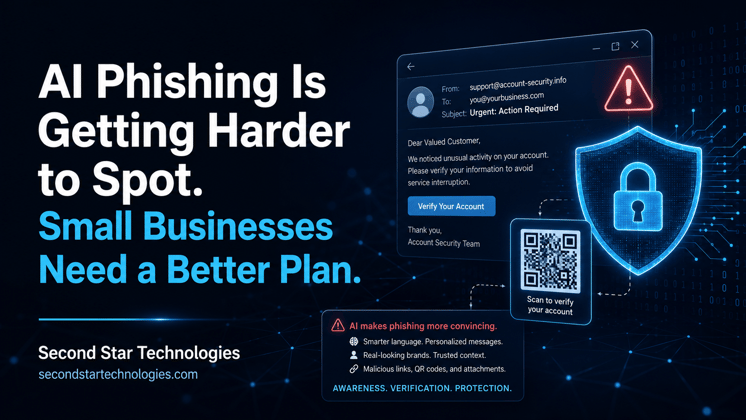
Phishing used to be easier to catch.
A strange greeting. A few spelling mistakes. A weird link. A message that sounded like it came from someone who didn’t know how people actually talk at work.
That’s changing fast.
Artificial intelligence is helping attackers write cleaner, more personal, and more believable phishing emails. QR-code phishing is also growing because it pushes people away from protected work devices and onto phones, where security tools may have less visibility.
For small businesses, this creates a simple problem:
Employees can no longer rely on old warning signs alone.
The answer is not panic.
The answer is a better system.
AI does not make phishing brand new.
It makes it faster and harder to detect.
Attackers can now use large language models to create emails that sound polished, natural, and specific to the target. That matters because many employee security tips still focus on old red flags, such as bad grammar, awkward wording, or obvious formatting mistakes.
Those signs still matter.
But they are no longer enough.
Recent research on AI-generated phishing found that AI-written phishing emails can match or exceed the engagement rates of traditional phishing campaigns. In real-world simulations involving more than 71,000 emails, researchers tested traditional phishing, QR-code phishing, and AI-assisted phishing across different organizations.
The results were clear enough for small businesses to pay attention.
AI can make phishing more convincing.
That should change how teams are trained.
The main question is no longer:
“Does this email look fake?”
A better question is:
“Does this request make sense, and can we verify it another way?”
Small businesses often think cybercriminals are only after large companies.
That’s not how modern phishing works.
Many attacks are built for volume. Others are built around simple business routines, such as invoices, payment changes, payroll updates, password resets, vendor notices, shipping alerts, shared documents, and Microsoft 365 login prompts.
Small businesses are attractive because they often have:
That combination creates room for mistakes.
A single fake invoice can lead to a wire transfer. A fake Microsoft 365 login page can lead to a stolen mailbox. A compromised mailbox can lead to more fraud because attackers can read real conversations and reply from a trusted account.
That’s why phishing is not just an “IT issue.”
It is a business risk.
For years, employees were told to watch for:
Those are still useful.
But AI weakens several of them.
A phishing email can now sound calm, clear, and professional. It can match the tone of a normal business request. It can mention real names, real job titles, and real business events pulled from public sources.
That makes the message feel familiar.
And familiar messages are dangerous when people are busy.
A fake email does not need to fool everyone.
It only needs to fool one person at the wrong time.
QR-code phishing, often called “quishing,” adds a different layer of risk.
Instead of asking someone to click a link, the email tells them to scan a QR code. That QR code may lead to a fake login page, payment portal, document share, or account verification page.
This works because QR codes can bypass some traditional security checks. The visible link is hidden inside the image. Employees may also scan the code with a personal phone instead of a managed business device.
That matters.
Research on emerging phishing threats found that QR-code phishing was as effective as traditional phishing at getting users to visit the landing page. The same research also noted that QR-code phishing can be harder for operational detection tools to identify.
Microsoft also reported major QR-code phishing growth in early 2026. According to Microsoft Threat Intelligence, the company detected about 8.3 billion email-based phishing threats during Q1 2026. QR-code phishing increased by 146%, and business email compromise activity exceeded 10 million attacks during the same quarter.
For small businesses, this means QR codes should not be treated as harmless shortcuts.
They should be treated like links.
Business Email Compromise, or BEC, is not always technical.
That is what makes it dangerous.
BEC often relies on trust, timing, and pressure. An attacker may impersonate an owner, executive, vendor, client, attorney, accountant, or manager. The message may ask someone to change payment details, send gift cards, approve a wire transfer, share payroll data, or open a fake document.
There may be no malware.
There may be no attachment.
There may be no obvious “hack” for a basic antivirus tool to catch.
Research on spear phishing and business email compromise describes these attacks as text-based and social-engineering driven. That makes them harder to define and harder to stop with traditional security controls alone.
That is why small businesses need business rules, not just software.
A good spam filter helps.
A clear payment approval process helps more.
Another challenge is that phishing does not always come from sketchy-looking infrastructure.
Enterprise phishing research shows attackers can use trusted networks and legitimate services to help phishing emails get delivered. In one study, more than one-third of phishing emails in the dataset came from highly reputable networks, including major cloud providers.
That matters because many businesses still think blocking “bad” senders is enough.
It is not.
Attackers may use real services, compromised accounts, shared file platforms, form tools, cloud storage, or email platforms that employees already recognize. This makes filtering harder and makes the email feel more normal to the person reading it.
Small businesses should not rely on one layer of defense.
They need layered protection.
Small businesses do not need a massive security budget to reduce phishing risk.
They do need a practical plan.
Start with the areas that reduce the most risk.
Multi-factor authentication is still one of the most important protections for business accounts.
But not all MFA is equal.
Text-message codes and basic push approvals are better than no MFA, but they can still be abused. Attackers may trick users into entering codes on fake login pages or approving sign-in prompts they did not start.
Better options include:
For Microsoft 365 environments, security defaults or conditional access policies can make a major difference when set up correctly.
This is one of the simplest and most useful controls.
Any request involving money, payroll, bank details, vendor payment changes, gift cards, or sensitive records should require a second form of verification.
Do not verify by replying to the same email.
Use a trusted phone number already on file. Use a known contact method. Confirm the request outside the email thread.
A simple rule can prevent a major loss:
No payment changes by email alone.
Security training should match how attacks work now.
Employees should still know the old warning signs, but training should also cover:
The goal is not to make every employee a security expert.
The goal is to slow down risky clicks and teach people when to ask for help.
For many small businesses, email is the front door.
If an attacker gets into one mailbox, they may find invoices, contacts, passwords, attachments, client data, vendor conversations, and internal approval chains.
Basic email protections should include:
Email security is not just about blocking spam.
It is about protecting the business conversations people trust every day.
Too many small businesses give users more access than they need.
That increases damage when an account is compromised.
Use the least access needed for each role. Separate admin accounts from daily-use accounts. Do not use global administrator accounts for normal email and web browsing. Review who has access to billing, payroll, cloud storage, accounting tools, and security settings.
The fewer high-value accounts attackers can abuse, the better.
Phishing can lead to ransomware, account takeover, deleted files, or data theft.
Reliable backups help the business recover faster.
Backups should be:
A backup that has never been tested is only a hope.
Test restores before you need them.
Employees should know exactly what to do when something feels wrong.
Make it easy to report suspicious emails, texts, QR codes, login prompts, and payment requests. Do not shame people for reporting. Do not shame people for clicking.
Shame makes people hide mistakes.
Hidden mistakes give attackers more time.
A good reporting culture sounds like this:
“Thanks for sending this over. We’ll check it.”
That response keeps people involved.
Small businesses should know what happens after someone reports a suspicious message.
A basic response plan should answer:
Do not wait until the middle of an incident to figure this out.
Write it down now.
AI-driven phishing makes managed IT support more important, not less.
Small businesses need help setting up the controls, monitoring the alerts, reviewing risky sign-ins, hardening Microsoft 365, testing backups, and building response steps that match how the business actually works.
A managed IT provider can help with:
The goal is not to scare employees.
The goal is to build a workplace where one bad click does not turn into a business crisis.
AI is making phishing harder to spot.
QR codes are creating new gaps.
Business email compromise is still a serious financial threat.
And attackers are getting better at using trusted services to make fake messages look normal.
Small businesses do not need to solve every cybersecurity problem overnight. But they should stop relying on outdated phishing advice.
The better path is simple:
Phishing works because it targets people during normal business moments.
A stronger process makes those moments safer.
Luo, E., Young, L., Ho, G., Afifi, M. H., Schweighauser, M., Katz-Bassett, E., & Cidon, A. (2024). Characterizing the networks sending enterprise phishing emails. arXiv. https://doi.org/10.48550/arXiv.2412.12403
Microsoft Threat Intelligence & Microsoft Defender Security Research Team. (2026, April 30). Email threat landscape: Q1 2026 trends and insights. Microsoft Security Blog. https://www.microsoft.com/en-us/security/blog/2026/04/30/email-threat-landscape-q1-2026-trends-and-insights/
Wassermann, S., Meyer, M., Goutal, S., & Riquet, D. (2023). Targeted attacks: Redefining spear phishing and business email compromise. arXiv. https://doi.org/10.48550/arXiv.2309.14166
Weinz, M., Zannone, N., Allodi, L., & Apruzzese, G. (2025). The impact of emerging phishing threats: Assessing quishing and LLM-generated phishing emails against organizations. arXiv. https://doi.org/10.48550/arXiv.2505.12104
.png?quality=low&height=230&name=The%20Role%20of%20IT%20Support%20in%20Business%20Continuity%20Planning%20(BCP).png)
The role of IT Support in Business...
Leave a Comment